Community Suggestion: Old Editor: Open in new tab
Old Editor: Open in new tab
User Interface (UI) / User Experience (UX) · Editor: plato · Created by Aelstyn
accepted
What functionality is missing? What is unsatisfying with the current situation?
Could the “Go to old version editor” option open in a new browser tab instead of replacing the current view? Right now it takes over the screen that shows the article tree, which I rely on when reviewing and navigating between many articles. I do not want to open a single article, make a change, then repeatedly navigate back through the tree again. When working across many articles for organization, tags, or similar bulk tasks, the current behavior makes that workflow significantly more cumbersome, especially when using the old editor.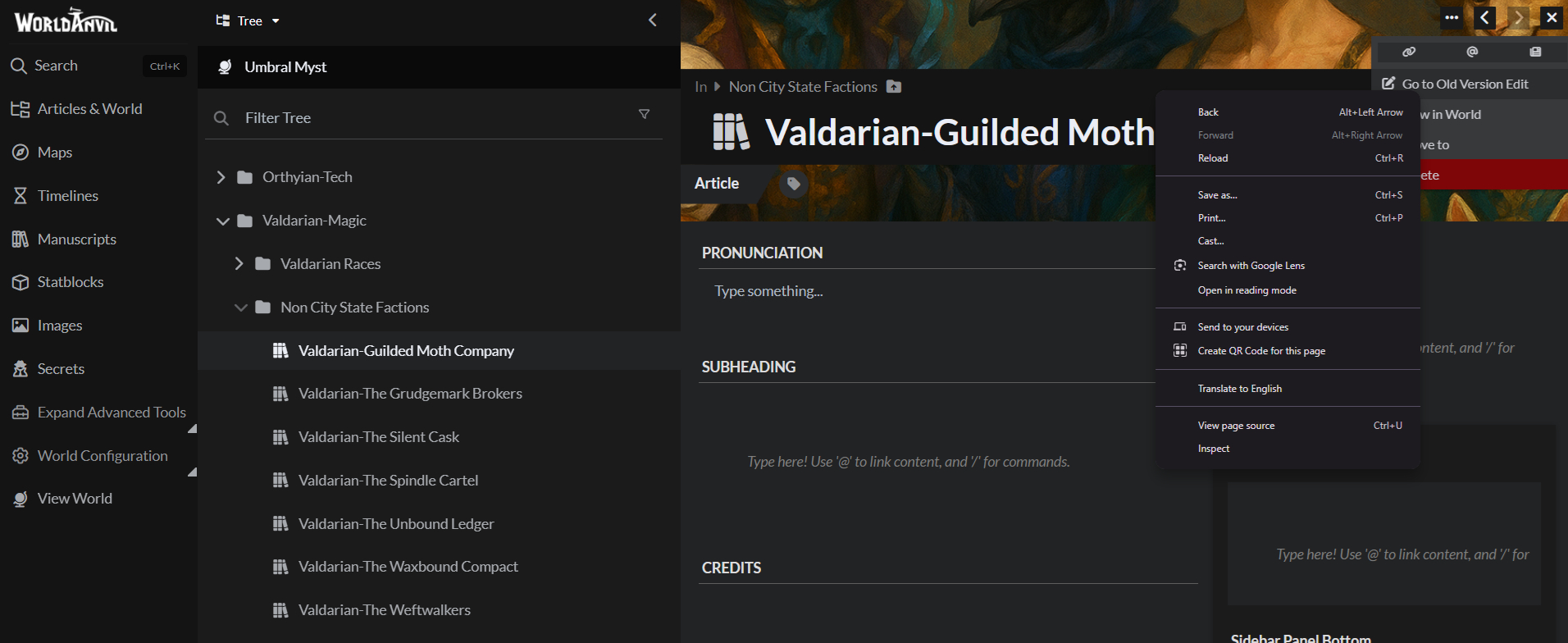
How does this feature request address the current situation?
Personally, I do not like the new editor. I find it cluttered, and it does not use space effectively or prioritize what I need to see. Elements like Pronunciation and Subheadings are low change items for me, yet they are placed front and center, while the actual article content is pushed lower on the page. There does not appear to be a way to meaningfully adjust this layout, and as a result it does not fit my workflow at all. Being able to ignore the new editor and open the old editor in a separate tab would allow me to continue working efficiently. This would prevent constant backtracking through categories and subcategories just to locate articles again, which becomes especially frustrating when managing large numbers of entries.What are other uses for this feature request?
There probably are not many beyond this, but it would generally benefit anyone doing bulk review, cleanup, or organizational work across multiple articles. ive written about 193k words in the last year or so for worldbuilding just in my new world and I started writing more outside of the tool than in it because of issues with the above mentioned. I apologize if its not plato and its EnclidI wasnt sure which to choose in the dropdown. CheersFollow up
it woudl be lovely that if I select goto old version edit, it opened a new tab
The Team's Response
Hi! This is an unintended inconsistency, we'll add the open in new tab behavior to that menu. In the meantime, you can already do this if you:- Edit an article (in the new UI)
- Click the ellipsis (...) button on the left of the slanted toolbar at the bottom.
- Ctrl+click the old editor option there (or right click -> open new tab).
Current score
22/300 Votes · +6700 points
Votes Cast
-
+300
by Rawilow
on 2026-01-26 20:00 -
+300
by Draconic Judy
on 2026-01-22 17:45 -
+300
by KarlZone
on 2026-01-20 13:07 -
+300
by Jupiter Melichios
on 2026-01-18 15:40 -
+300
by PrippyMontyPoppyCock
on 2026-01-16 20:23 -
+300
by AsterVela
on 2026-01-16 16:20 -
+300
by SplendorS
on 2026-01-12 17:24 -
+100
by WeStanNikolai
on 2026-01-12 13:58Now that the new editor doesn't lag so much anymore, I actually quite like it for quick and short bulk edits, but I still use the old editor for new articles or longer edits, so it automatically opening in a new tab would be really useful. In the meantime: If you are using a mouse, clicking on the mousewheel to press "Open in Old Editor" should open it in a new tab! That's what I do with any link I want to open in a separate tab.
-
+300
by Shadowfell
on 2026-01-12 01:46 -
+300
by Thavner
on 2026-01-11 15:50I miss the older interface, it ran so much faster on both my home and work computers.
-
+300
by Cyric
on 2026-01-11 15:17 -
+300
by niiconiico
on 2026-01-10 03:23 -
+300
by BenScerri
on 2026-01-10 01:24I'm in the same boat re: the new editor, and whilst I'd prefer a roll-back, or an option to default to the old editor if we prefer, this sounds like a reasonable half-way point. Would love to see this implemented. It might make me actually start using WA again to a similar degree as I did pre-update!
-
+300
by ss2020
on 2026-01-09 23:31 -
+300
by ProtoRaptor40
on 2026-01-09 16:05 -
+300
by Scalenex
on 2026-01-09 05:34 -
+300
by Lonnie makes mayhem
on 2026-01-09 03:19 -
+300
by A Roaring Skeleton
on 2026-01-08 22:10 -
+300
by A Goodhearted Goblin
on 2026-01-08 17:37 -
+300
by A Glamorous Dimensional Horror
on 2026-01-08 07:07 -
+300
by Ratha
on 2026-01-07 20:45 -
+300
by Comic Book Lady
on 2026-01-07 19:16 -
+300
by Aelstyn
on 2026-01-07 15:52
Find your way!
Resources
WHO WE ARE
LEGAL
Listen to our Podcast




by 3 Armored Kittens · Prodromos v.1.1 - World Anvil 0.9.15.050 © 2017-2025 [en] | Anvil Time: 22:36, Oct 12 2026