

To partake in the World Anvil community, you can join our Discord server. Syncing your World Anvil account with Discord will help you get the most out of this channel by giving you access to exclusive areas. Here's how to do it!
- To join the WA Discord, use this link and accept our invite!
- In any channel, start typing /sync and select 'sync' from the drop-down box
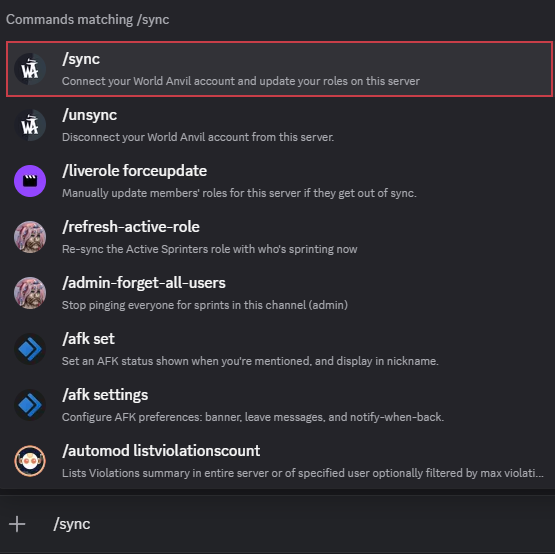
- A private link to click will appear. No one else in the channel will be able to see this. The link expires after 15 minutes, and you should make sure you don't share it with anyone.
- The link takes you to a page showing your Discord and World Anvil account. Click 'Confirm & Sync' to authorise.
- You will then see a success message. If you now check Discord, your user name will no longer be white and will now be the shade of your membership tier, ie red for Master, purple for Grandmaster, and teal for Sage.

How to resolve difficulties with syncing
If you have difficulty syncing, you can open a bug report here, or a ticket by typing /tickets open into any Discord channel and selecting the corresponding item from the drop-down that appears.
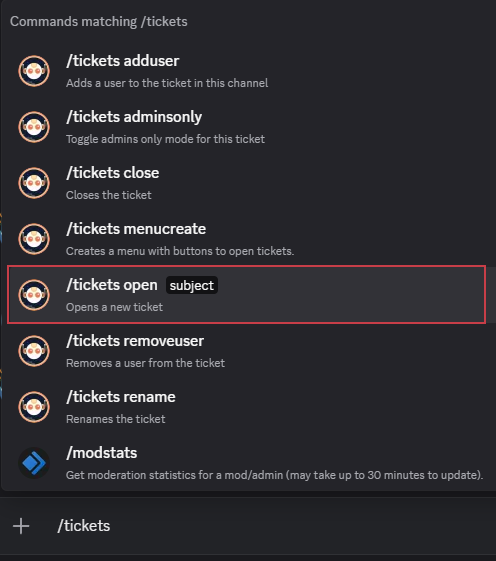
Add 'unable to sync Discord and World Anvil accounts' to let the moderators know the problem

Note: If you have received help at any point from the moderators to help sync your roles, please try running sync yourself again to make sure that it is confirmed. Running sync when you are already synced will not unsync your roles.